
Phone got wet: what to do (and what not to do)
Step-by-step advice for handling a wet Android phone, including what actually helps, what can make things worse, and when it is safe to try charging again.
You fish the phone out of the sink, the screen is still on, and your first instinct is to press every button to see if it survived. Don’t. The best move in that moment is boring: stop electricity, get liquid away from openings, and give the phone time.
Water damage is messy because the problem isn’t only the water. The real trouble starts when moisture, minerals, salt, sugar, or cleaning chemicals sit on tiny contacts and the phone keeps trying to run.
First minute: do less, not more
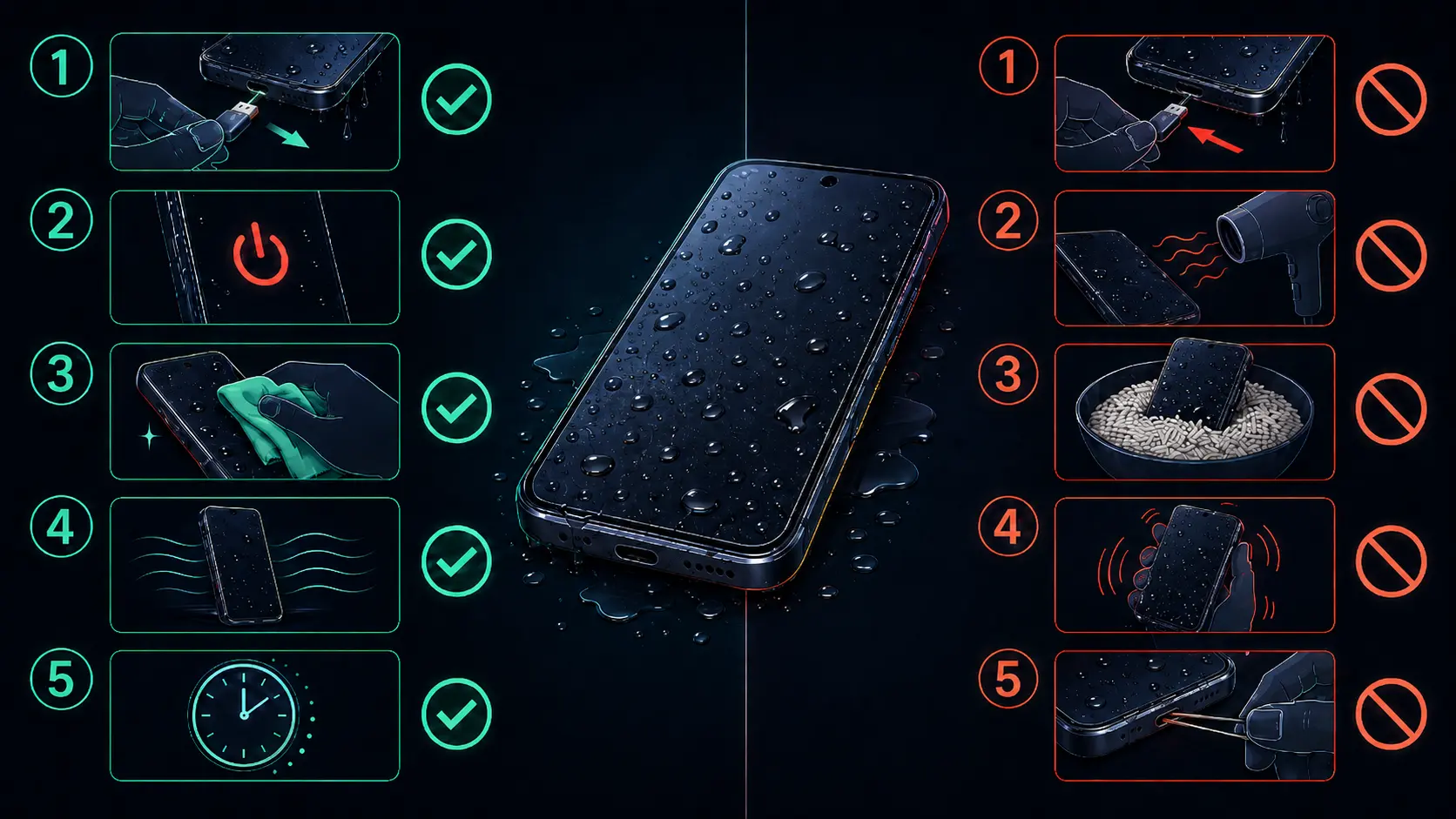
Take the phone out of the liquid immediately. If it’s still on, power it off. A wet phone that’s off has a better chance than a wet phone still pushing current through the board.
Remove the case, unplug every cable, and take out the SIM tray. If the phone has a microSD card, remove that too. A few older Android phones and some rugged models still have removable batteries. If yours does, take the battery out and dry it separately with a soft cloth.
Now stop testing it. Don’t unlock it, don’t open the camera, don’t plug it in to “see if it charges.” That curiosity can turn a recoverable accident into a short circuit.
Dry the outside first
Hold the phone with the charging port facing down and tap it gently against your palm. The goal is to help pooled liquid leave through the USB-C port, speaker grilles, and SIM slot. Gentle is the key word. Violent shaking can push liquid deeper into gaps around the display and buttons.
Wipe the exterior with a soft, lint-free cloth. Microfiber is ideal. Dab around the openings instead of stuffing cloth into them.
Then leave the phone in a dry, ventilated place. A room-temperature fan, an air-conditioned room, or a shelf with good airflow is better than heat. Keep the charging port facing down if you can. If you have silica gel packets, put the phone and several packets in a sealed container. Silica gel won’t perform miracles, but it’s a much better drying aid than rice.
What not to do
Don’t put it in rice
Rice is one of those tech myths that refuses to die. Apple explicitly warns against putting a wet iPhone in rice because small particles can damage the connector, and the same basic risk applies to USB-C Android phones. Rice dust in a charging port is not an upgrade.
Don’t use heat
No hair dryer, heat gun, oven, radiator, sauna, or long direct-sunlight session. Heat can soften adhesives, stress the battery, warp plastic parts, and move moisture further into the device. Room-temperature airflow is fine. Hot air is not.
Don’t charge it with a cable
A wet USB-C port and a charging cable are a bad combination. Many modern phones show a moisture warning when the port is wet, including Samsung Galaxy models, but not every phone will warn you. Wait until the phone is fully dry before plugging anything into the port.
Wireless charging is not a shortcut for a soaked phone. It avoids the USB-C port, but the phone can still be wet inside.
Don’t poke around the port
Avoid metal tools, paper towels, and cotton packed into the connector. If there is visible water, let gravity and airflow do the work. If there is debris later, clean it only after the phone is dry and powered off.
How long to wait
For a light splash or a moisture warning in the port, several hours may be enough. For a full dunk, 24 hours is the bare minimum I would trust, and 48 hours is safer. If the phone was in saltwater, pool water, soda, coffee, soapy water, or anything sticky, don’t treat it like a normal splash.
Residue matters. Samsung’s guidance for water-resistant Galaxy devices says that if liquid other than fresh water gets into the charging port, the affected area should be rinsed with fresh water and dried thoroughly. That advice is for residue in openings on water-resistant devices, not permission to wash a damaged phone under the tap. If the phone is already cracked, bent, old, or clearly failing, skip the DIY rinse and go straight to a repair shop.
After the drying period, reinsert the SIM tray and try powering the phone on. If it starts, test the boring stuff: speaker, microphone, cameras, touchscreen, buttons, charging, fingerprint sensor, and mobile signal. Water damage can show up days later, so back up important data immediately.
What IP ratings actually mean
IP67 means protection against dust and temporary immersion in fresh water, commonly up to 1 meter for 30 minutes. IP68 goes beyond IP67, but the exact depth and duration are set by the manufacturer. Many Galaxy phones are rated around 1.5 meters for 30 minutes, while other phones use different limits.
IP69 or IP69K on some newer and rugged phones means protection against high-pressure, high-temperature water spray tests. It does not mean the phone is safe for seawater, hot tubs, soap, drops, or repeated dunking.
Water resistance is tested in controlled lab conditions with clean, still water. Real accidents are uglier. Saltwater corrodes, pool water leaves chemicals behind, soap lowers surface tension and can sneak through seals, and a drop can deform the frame just enough to break the seal. Water resistance also wears down as adhesives and gaskets age.
And don’t assume the warranty will save you. Apple and Google both state that liquid damage is not covered under their standard warranty, and Android manufacturers generally treat liquid damage as accidental damage unless you bought a protection plan that says otherwise.
When a repair shop makes sense
Take the phone in if it won’t power on after drying, keeps showing a moisture warning, gets unusually hot, flickers, loses touch response, or has muffled speakers that don’t clear up. A shop can inspect the USB-C port, check for corrosion, and in some cases clean the board with proper equipment.
If the phone turns on, back it up before celebrating. That’s the boring advice, but it’s the advice that saves people when corrosion shows up a week later.
FAQ
Can a phone survive several minutes underwater?
Sometimes. A powered-off phone in clean water has a better chance than a phone that stayed on in saltwater. Time matters, but the liquid type, battery state, cracks, and water resistance condition matter just as much.
Does the type of liquid matter?
Yes. Fresh water is the least bad. Saltwater is corrosive, pool water leaves chemical residue, and sugary drinks can keep causing trouble after the liquid evaporates. Anything other than fresh water raises the repair risk.
My Samsung moisture warning won’t go away. What should I do?
Leave the phone powered off in a dry place with airflow for longer. Samsung also documents cases where clearing the USB settings/cache can help after the port is dry, but don’t use that as a way to override a genuinely wet port. If the icon keeps returning, have the port inspected.
Should I open the phone?
Only if you already know how to disassemble that model and have the right tools. Modern phones use strong adhesive, fragile display cables, and thin batteries. For most people, opening the phone creates a second problem.
Sources
Turn symptoms into a clearer picture of your phone's health.
runcheck connects battery, heat, signal, and storage patterns so you can see what is really dragging a phone down.